Page 1 of 1
Why does this happen?
Posted: January 11th, 2026, 11:07 am
by sagevanni
Hi everyone,
I have an issue I can not figure out.
I have a directory separate from my APCD main directory Where I keep released courses.
When I open a course from this directory more often than not I get this......
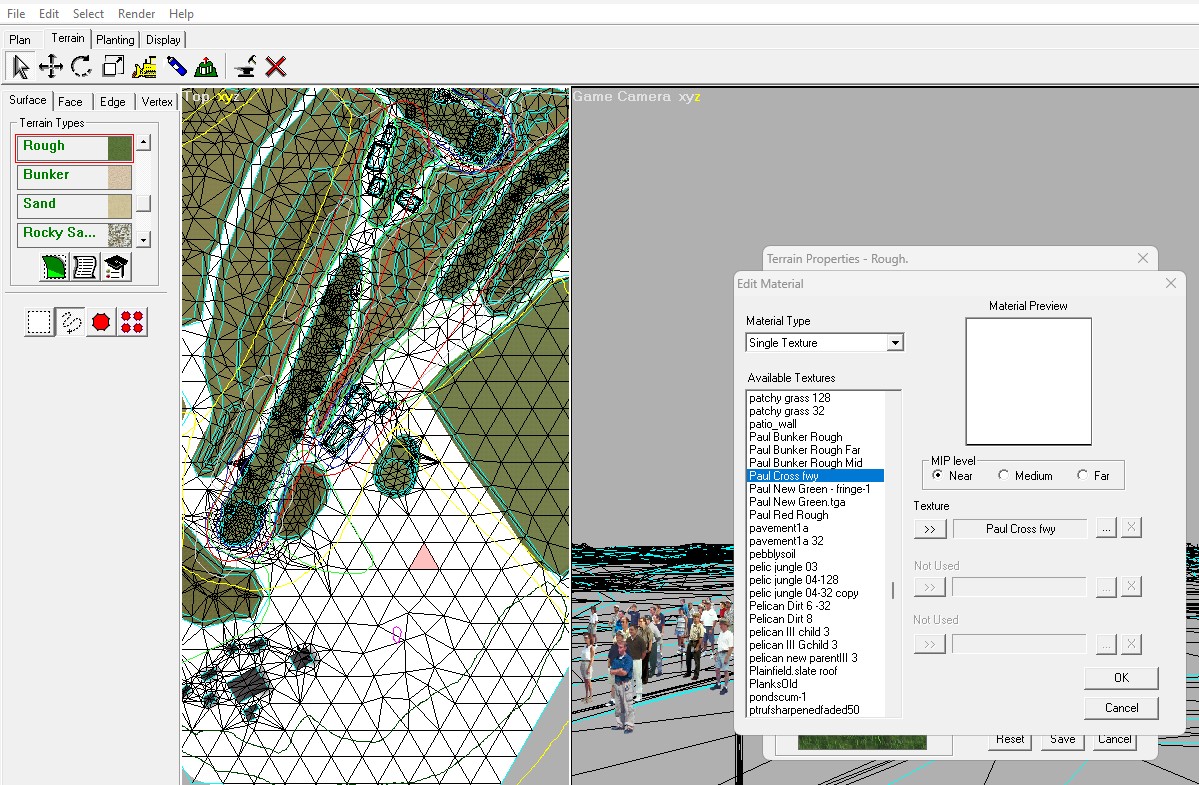
- Screenshot 2026-01-11 120209.jpg (329.74 KiB) Viewed 9660 times
Can anyone tell me why? This only happens to custom textures not APCD default textures.
Thanks......Sage......

Re: Why does this happen?
Posted: January 11th, 2026, 12:15 pm
by pmgolf
I don't exactly understand this, Sage.
Pete
Re: Why does this happen?
Posted: January 11th, 2026, 12:37 pm
by Ian Wells
Sage,
I can only assume that in the APCD the you opened the course from the texture "Paul Cross fwy" is the white that you see here?
I keep an APCD file for each course so that the textures for each course are unique to that course. If I want to open different courses in a new APCD I always delete the user.lib file first before opening the course.
I can't think of anything else.
Good luck.
Ian
Re: Why does this happen?
Posted: January 11th, 2026, 2:17 pm
by sagevanni
Thanks Ian........
I used to do it that way and I think I might go back........
Sage......
Re: Why does this happen?
Posted: January 12th, 2026, 12:00 am
by Colin Jones
It happens when you delete textures. All the other textures properties including the mids and fars get mixed up. For example you might see your new Rough far texture becomes white paint! If you zoom in further I bet the textures appearance changes.
Pretty much as Ian said: No problem opening your course up in a fresh version of APCD but, in my opinion, you shouldn’t open it up in a version where you already have other customised textures. Is that what you did Sage?
Colin
Re: Why does this happen?
Posted: January 12th, 2026, 4:31 am
by sagevanni
Yes..........
I'm going back my old directory structure................
Thanks guys...!!!!!
Sage......